Current · Design Lead AI-native ERP Foodservice eCommerce Oct 2024 — now

A custom eCommerce ERP for a 16,000-SKU foodservice & packaging operation.

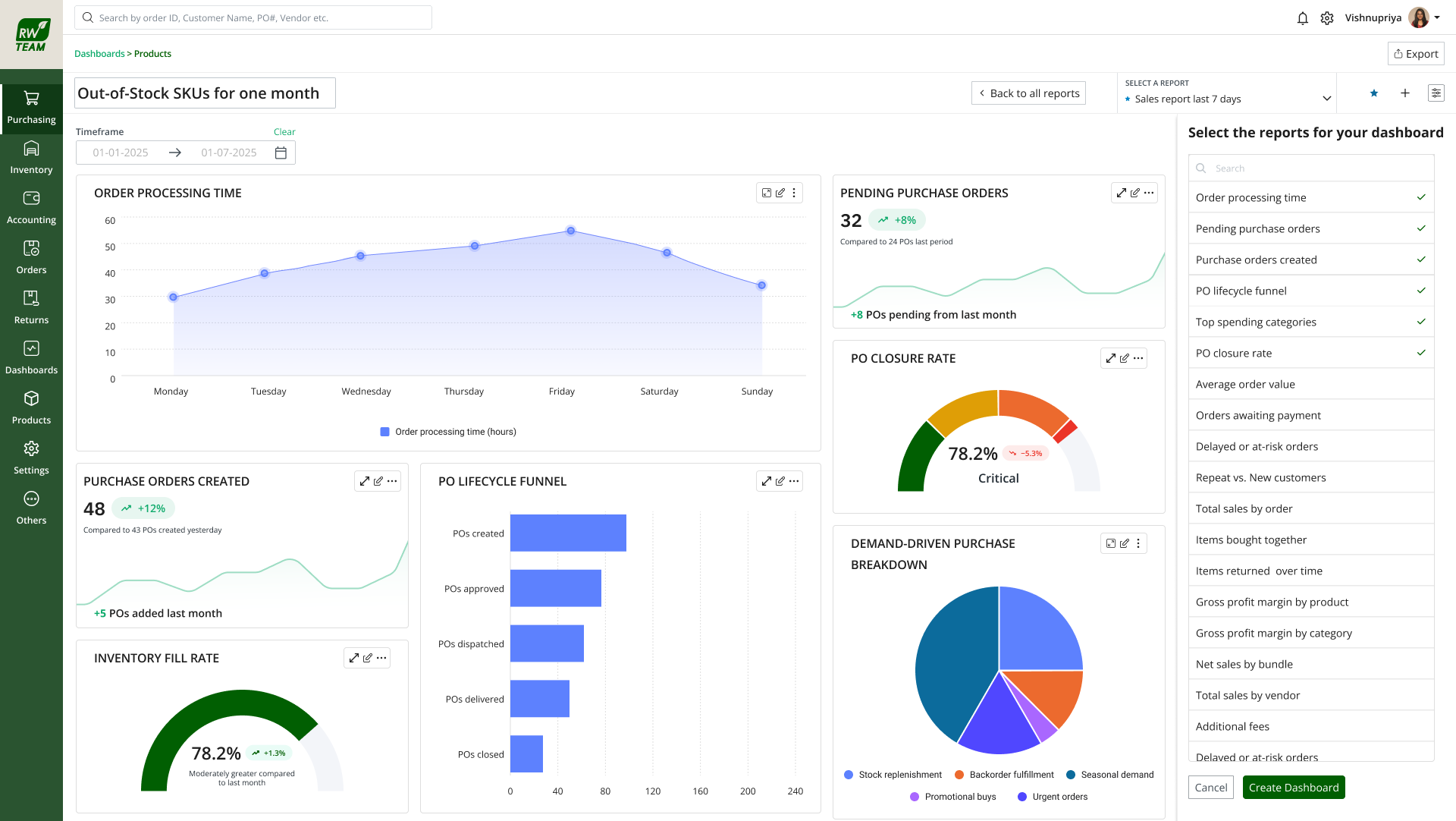
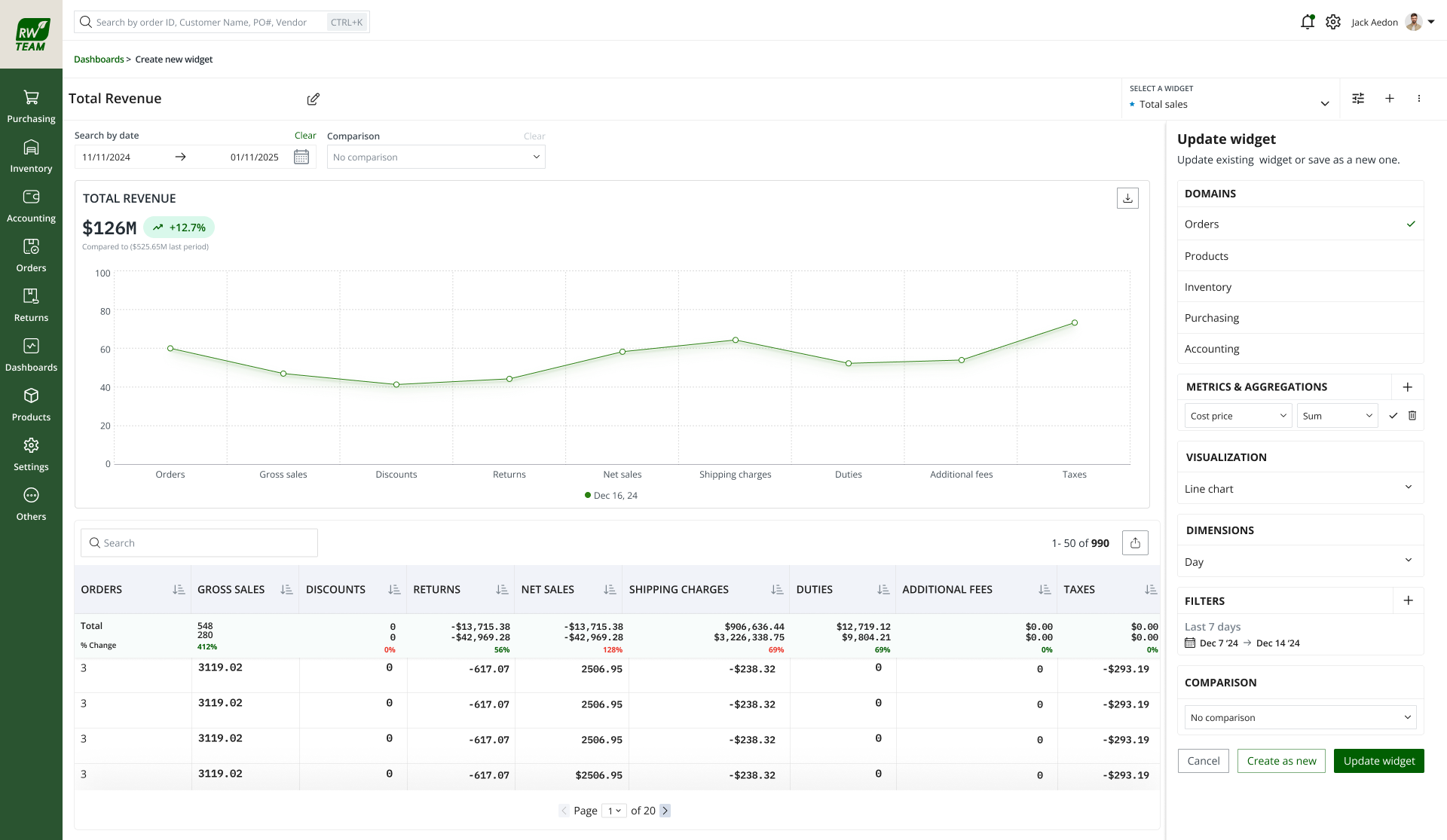
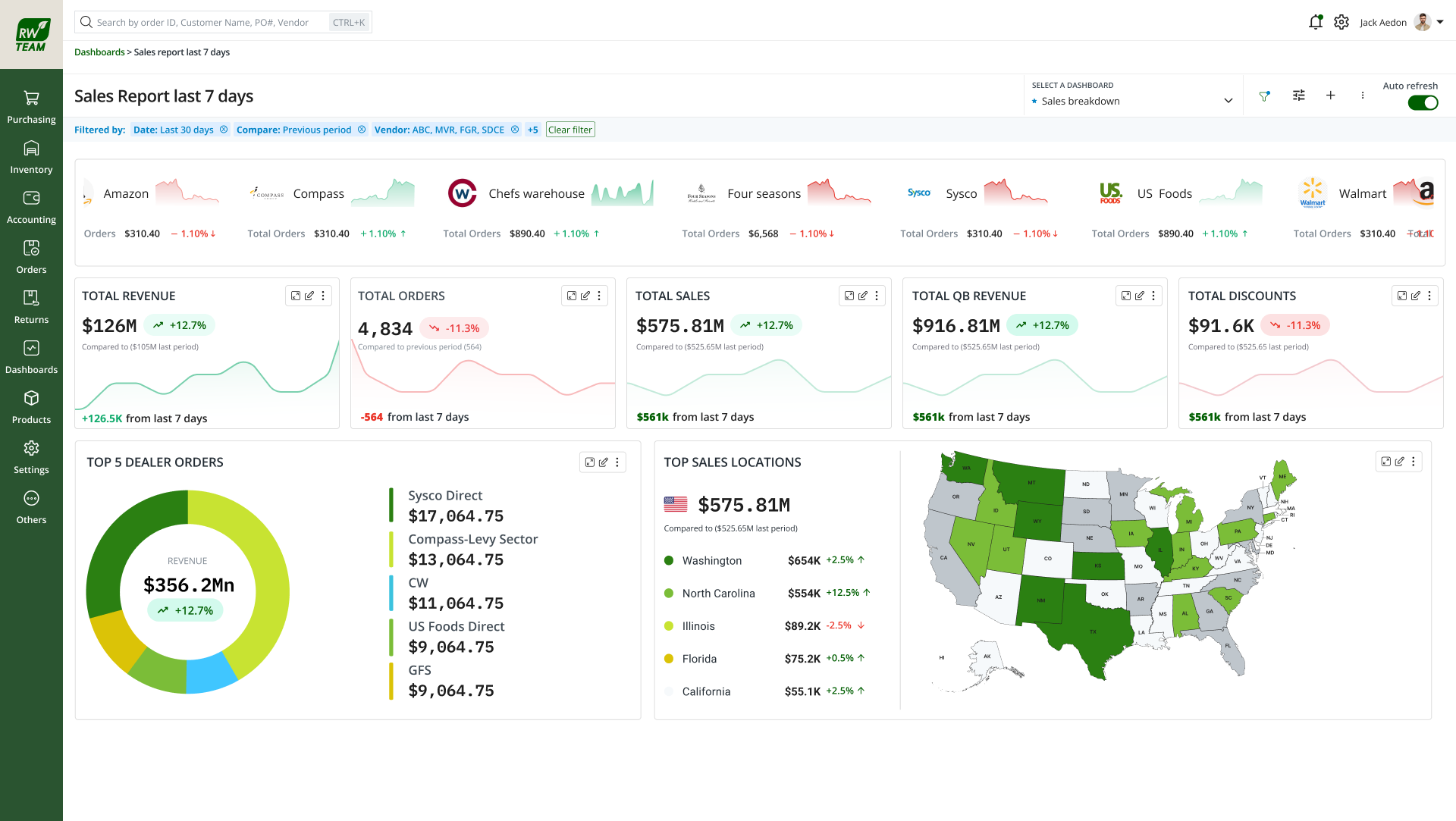
HikeOn is building a multi-module ERP for a US-based foodservice and sustainable-packaging eCommerce brand — catalog, inventory across multiple warehouses, B2B and retail orders, a custom-printed-product workflow, fulfilment, returns, supplier and purchase orders, finance, and reporting on one system. I lead product design end-to-end: UX strategy, the 250+ component design system, engineering partnership on the design-to-code pipeline, and the 8+ AI use cases now live across the product.

Role
Product Design Lead
Lead Designer
Team
Partnered with 1 PM,
12 engineers (Vue.js)
Duration
Oct 2024 — present
(18 months and counting)
Outcome
250+ components in prod,
8+ AI use cases live
01 · Problem

A 16,000-SKU catalog, seven business categories, and a back-office stitched together from tools that don't talk to each other.

The business sells across seven distinct product categories — disposables, smallwares, food & beverage, tabletop, equipment, storage & transport, janitorial, industrial — plus a customizable-products line where customers order custom-printed cups, bags, boxes, and labels with their own artwork. Each category has different attributes, different supplier networks, different fulfilment paths, and different margins.

When I joined, the back-office was a stack: a separate PIM for catalog, spreadsheets for forecasting, a custom queue for the custom-print orders, a different tool for B2B quotes and catering bulk orders, another for the rewards programme, and email threads for supplier POs. The business was scaling. The tooling wasn't.

"The catalog grew faster than the team could keep up with. We had product managers chasing sustainability claims across three systems and warehouse leads guessing at restock priorities. The ERP exists to fix that." — Founder brief, first week on the job

Three specific problems to solve:

  • No design system. Eight modules were being designed by different people in different Figma files, with 40+ inconsistent patterns shipping every sprint. Buttons, tables, and forms were implemented five different ways.
  • AI features felt bolted on. Each AI use case was a separate modal with a different pattern. The team was about to ship a ninth without any shared language.
  • Custom-product orders were a black box. The custom-printed line is the highest-margin category — and the most operationally complex. Artwork approvals, MOQ checks, supplier handoff, and proof-cycle states were tracked in Slack, not the system.
02 · Process

Audit first, then build the foundation, then ship features on top.

I resisted the pull to start redesigning screens. For the first three weeks I did an audit of every component, pattern, and AI touchpoint across the eight modules — shipped screens, Figma files, supplier-portal flows, and conversations with the 12 engineers actively building. The audit produced 240 distinct UI "things" that needed to become ~60 canonical components.

Then I sequenced the work in three parallel tracks that kept engineering unblocked while the system got built:

  • Track A — Foundations (sprints 1–3): tokens, typography, spacing, color, iconography. Shipped to Vue.js as CSS variables so engineers could adopt immediately, ahead of component work.
  • Track B — Core components (sprints 2–8): buttons, inputs, tables, modals, cards, empty states. Each component shipped with variants, tokens, dark mode, and a Figma↔Vue parity review.
  • Track C — AI patterns (sprints 4+): a canonical pattern set for AI suggestions, confidence scoring, "why this?", and overrides — applied across every AI touchpoint in the product.
03 · Design system

Tokens, variants, and the Figma → Vue.js pipeline that kept design and code in sync.

The system is built on three layers of tokens — primitive (raw hex, raw px), semantic (brand.primary, surface.raised, text.subtle), and component (button.primary.bg, table.row.hover). Engineering consumes the semantic layer. Design never references the primitive layer in a component. Theming, density, and a planned customer-facing portal all become config, not rework.

Component architecture is Figma Auto Layout with semantic variables and booleans — every component is one master with variants for size, intent, state, density, and theme. Replaced 240+ one-off "things" with 64 canonical components covering 100% of the product.

Components shipped
250+ Figma components · 64 canonical (sized, state, density variants) · 100% of product covered
Tokens
3-layer architecture · 480 semantic tokens · auto-synced to Vue.js via build script
Theming
Light + dark · dense + comfortable density · ready for a customer portal extension
Accessibility
WCAG AA for all semantic pairs · keyboard-complete for every interactive component
Figma → Vue.js parity
Same-sprint handoff · each PR reviewed design + eng before merge
surface.nav
#1A2535
surface.base
#F5F6F8
brand.primary
#22C55E
semantic.positive
#16A34A
data.blue
#4A8FE8
semantic.warning
#F59E0B
04 · AI in the product

Eight AI use cases, one canonical pattern set.

A 16,000-SKU catalog with seasonal demand, multi-warehouse stock, and a custom-print operation generates more decisions than any operator can keep in their head. The AI work isn't decoration — it's how the team makes those decisions on time.

Rather than design eight bespoke AI experiences, I defined a shared "AI cell" pattern with four consistent parts: the suggestion, confidence, "why this?" explainer, and accept / edit / dismiss actions. Every AI surface in the product is a composition of those parts — so users learn the interaction once and trust it everywhere.

✦ Forecast

Demand forecasting

7-day, SKU-level demand with confidence scoring. Operators can override and the model learns from the override.

TriggerScheduled · daily
Avg confidence78%
✦ Restock

Automated PO generation

Flags SKUs about to run out across warehouses, suggests quantity and supplier, drafts a PO for one-click approval.

TriggerOn threshold
Accept rate64%
✦ Search

Natural-language search

"Show me catering orders over $5k from last week that haven't shipped" → structured query and filtered view.

TriggerUser · on demand
Queries / day~340
✦ Insight

Daily insights digest

Morning surface: "Top 3 movers, 2 at-risk SKUs, 1 margin anomaly" — each with a direct CTA.

TriggerScheduled · 8am
Open rate72%
✦ Proof

Custom-product proof routing

On a new custom-print order, checks artwork against print specs, flags resolution or bleed risks, and routes to the right press operator.

TriggerOrder received
Time saved20 min / order
✦ Personalisation

Role-based homepage

Buyer vs. fulfilment lead vs. accountant — different surfaces promoted based on task history and role.

TriggerOn login
Time-to-task−28%
✦ Margin

Margin anomaly detection

Flags SKUs whose realised margin diverges from expected by more than 1.5σ — usually a freight or supplier-cost change the catalog hasn't caught up to.

TriggerNightly
Actionable flags~6 / week
✦ Research

AI-assisted research loops

Internal tool: cluster customer interview transcripts into themes. Used by PM + design weekly.

TriggerInternal · on demand
Themes / cycle~12

"The AI shouldn't feel like a feature. It should feel like the product thinking with you. That means the same shape, the same voice, the same 'why this?' link — everywhere." — Design principle in the AI pattern guide

05 · The custom-product workflow

The hardest module. Where catalog, supplier, fulfilment, and customer service meet.

The custom-printed-products line is the highest-margin category and the most operationally complex. A single order can involve: customer artwork upload, MOQ and material checks, an automated proof, a customer revision cycle, supplier handoff, a press scheduling slot, sample approval, and bulk run scheduling — across multiple suppliers depending on the substrate.

I designed it as a single timeline view per order rather than the modal-stack the original product was heading toward. Every state is visible. Every blocker is attributed to a person or system. The customer-facing proof emails are generated from the same data — so what the operator sees and what the customer receives are the same record.

Key decisions:

  • One timeline, not five tabs. Operators were context-switching between artwork, supplier, and customer threads. The timeline collapses that into a single ordered surface.
  • Proof state is explicit, not implicit. "Awaiting customer approval" is a first-class state with an SLA, not a status anyone has to infer from email.
  • Supplier handoff is a button, not a copy-paste. Eliminated the manual brief that was being assembled from three places for every order.
06 · What I owned

Lead Designer, embedded in engineering, collaborating with cross-functional teams.

UX strategy
Set design direction across eight modules; reviewed roadmap monthly with PM and founder
Design system
Sole owner — Figma architecture, tokens, variant system, and the Figma↔Vue.js handoff process
AI patterns
Designed the shared AI cell pattern and shipped 8+ use cases on top of it
Custom-product workflow
End-to-end design of the highest-margin operational flow in the product
Engineering partnership
Paired daily with the FE lead; reviewed every component PR before merge
Research & usability
Ran interviews with operators, fulfilment leads, and B2B buyers; built the AI-assisted synthesis loop
Stakeholder alignment
Monthly design review with founder + PM; quarterly roadmap and KPI checkpoints
07 · Outcomes

What the numbers look like, 18 months in.

250+
COMPONENTS SHIPPED
FIGMA → VUE.JS
8+
AI USE CASES
LIVE IN PRODUCT
−62%
DESIGN-TO-DEV
HANDOFF TIME
+34%
PILOT WEEKLY ACTIVE USE
AMONG OPERATORS
64
CANONICAL COMPONENTS
COVERING 100% OF UI
480
SEMANTIC TOKENS
AUTO-SYNCED TO CODE
72%
AI DIGEST
DAILY OPEN RATE
−28%
TIME-TO-FIRST-TASK
ON PERSONALISED HOME
08 · Reflections

What I'd do again, what I'd do differently.

DO AGAIN

Audit before redesigning. Three weeks of mapping felt slow at the time; it saved three months of rework. Every future DS project starts with an audit.

DO AGAIN

Ship tokens before components. Engineers were adopting the semantic palette by sprint 2 — no wait for components. It set the tone that design unblocks engineering, not the other way round.

DO AGAIN

One canonical AI pattern. Operators trusted the AI faster because every surface behaved the same way. "Why this?" became a product-wide affordance, not a feature.

DO AGAIN

Treat the highest-margin workflow as a design problem, not a backlog. The custom-product timeline was three sprints I had to argue for. It's now the most-cited screen in operator interviews.

DIFFERENTLY

Hired a second designer earlier. I was the bottleneck from sprint 10 onwards. Should have made the case to the founder by sprint 5.

DIFFERENTLY

Built the design-to-code sync script in-house from day one. A manual process for the first 3 months; automating the token export would have shaved hours per sprint.

LESSON

AI confidence scores are table stakes; override memory is what builds trust. The first version shipped without it and accept-rates plateaued at 40%. After adding it, they climbed to 64%.