← All work
Deep dive · HikeOn ERP Design System
Deep dive Design System Figma → Vue.js WCAG 2.2 AA 2 vibe-coded plugins

A 250+ component design system, built from zero — with two custom plugins keeping it honest.

The HikeOn ERP design system is the source of truth for a custom eCommerce ERP serving a US-based foodservice and packaging brand with a 16,000-SKU catalog. I lead its architecture, governance, adoption, and tooling. This is the deep-dive companion to the HikeOn case study — focused entirely on how the system is built and how it stays healthy.

Role
Design Systems Lead
+ AI Product Design Lead
Team
6-member design team
Daily sync with eng architects
Timeline
Oct 2024 — present
Built from zero
Scale
250+ components · multi-mode
Figma → Vue.js · web + mobile
01 · The problem

No shared system. Designers improvised. Engineers rebuilt the same components per module.

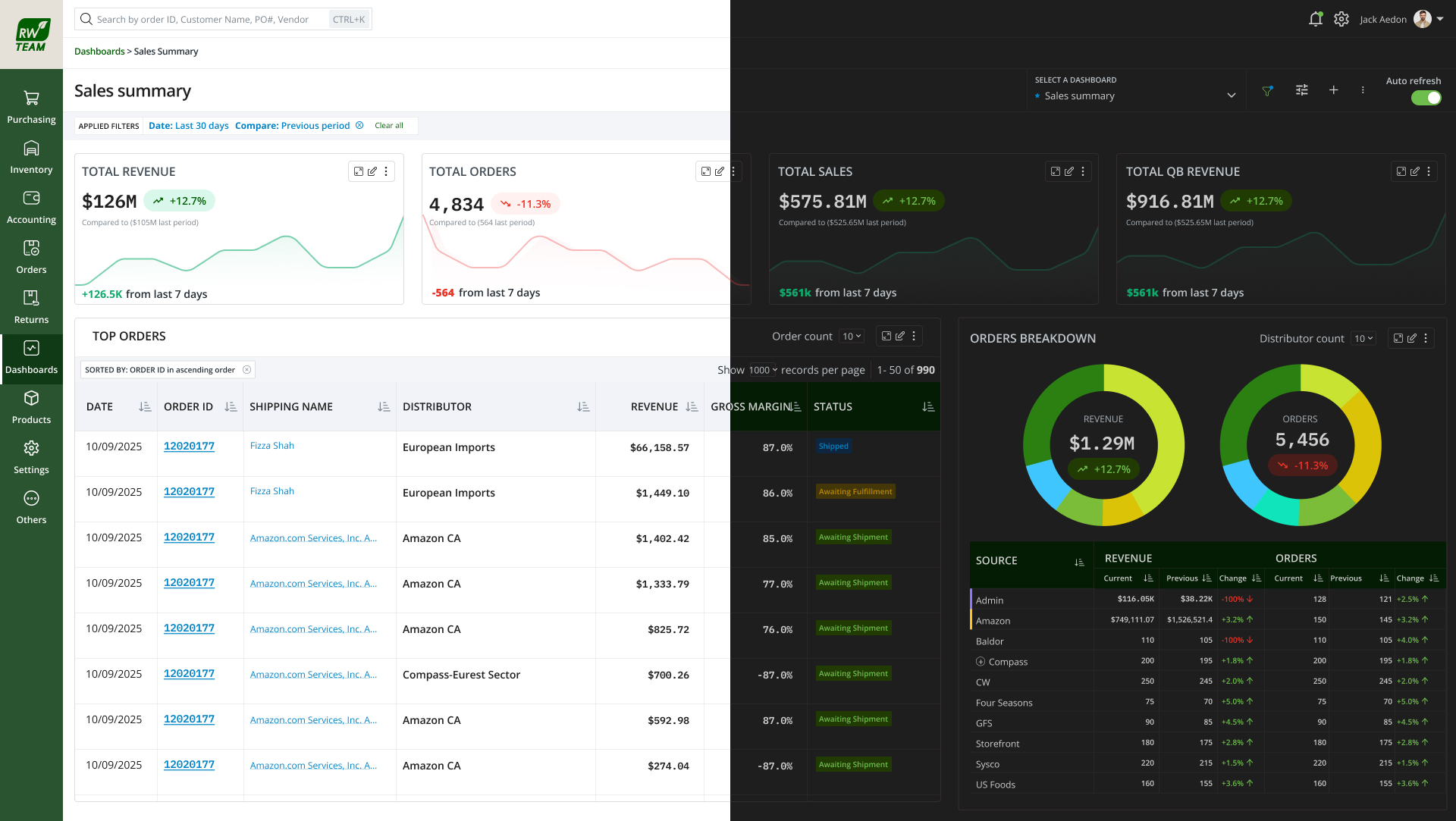
When I joined HikeOn, the product team was building a custom eCommerce ERP from scratch with no shared system. Designers improvised in each file. Engineers rebuilt similar components per module. Three problems compounded fast:

  • Visual and behavioural drift across modules. Buttons, form fields, and tables looked and behaved differently depending on who built them.
  • Tokens were inconsistent. Colors, spacing, and typography were hardcoded in Figma and again in code. Theming and white-labeling for multiple tenants was effectively impossible.
  • Handoff friction was high. Engineering had to interpret design intent every time. Discrepancies between Figma and shipped UI surfaced late in QA, when fixes were expensive.

On top of that, the product had a growing surface area: order management, catalog, purchasing, AI-assisted workflows, dashboards, and customer-facing storefronts. Without a system, the team would lose more time to rework than to new features.

02 · Goals

A single source of truth that measures its own health.

  • Ship a single source of truth for design, structured so engineers can map directly to Vue.js components without translation.
  • Build a token architecture that supports theming, dark mode, density, and white-label brands without forking components.
  • Establish a contribution model that lets designers and engineers outside the core team add to the system without breaking consistency.
  • Make accessibility a default, not a late-stage fix.
  • Track adoption and design debt as measurable metrics, not vibes.
03 · Figma architecture

Four libraries, three token layers, one naming contract.

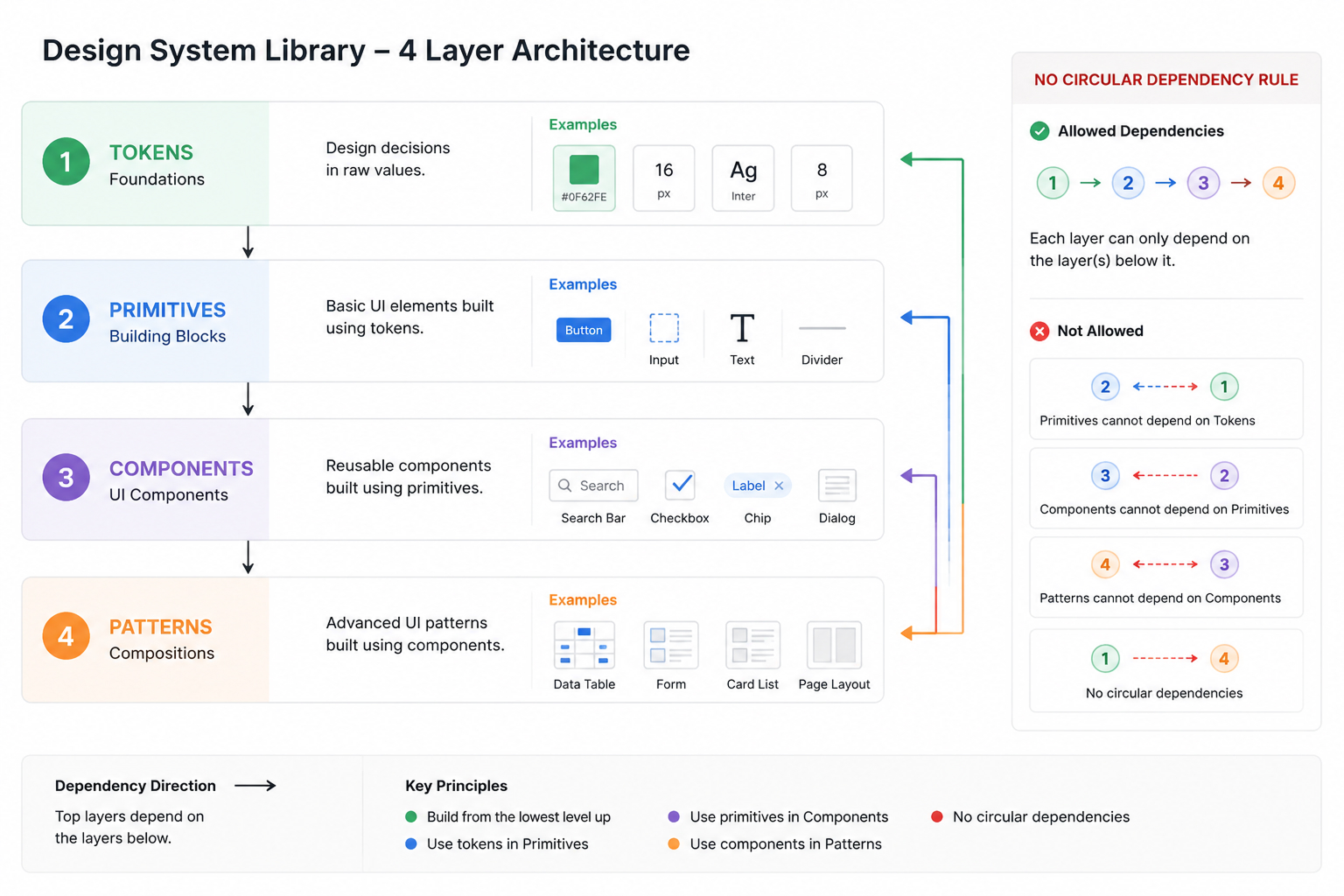
Library structure. The system is split into four publishable Figma libraries. Each has a clear scope and depends only on the layer beneath it. This keeps blast radius small when a token or primitive changes.

LibraryScope
01_TokensPrimitive and semantic variables for color, spacing, typography, radius, elevation, motion. No components.
02_PrimitivesAtomic components: icons, avatars, badges, dividers, base inputs. Consume only tokens.
03_ComponentsComposite components: buttons, form fields, data tables, navigation, modals, charts, AI interaction patterns. Consume primitives and tokens.
04_PatternsPage-level and flow-level patterns: empty states, error states, AI confidence states, copilot panels, multi-step forms.
Four-layer library dependency diagram

Token architecture. Tokens use a three-layer model. Primitive tokens hold raw values. Semantic tokens describe intent. Component tokens map intent to specific UI roles. This is what makes theming and white-labeling possible without forking components.

LayerExample & rule
PrimitiveRaw values in the Colors collection — Colors:Grey/Grey-1200, Colors:brand/color-brand-900-brand, Colors:white/Color-white-1000, Colors:Pallet/Pallet-01-default. Designers never reference these in components.
SemanticTEXT/text-defaultGrey/Grey-1200 (Light) / white/Color-white-100 (Dark) · BACKGROUND/bg-page-primarywhite/Color-white-1000 (Light) / Grey/Grey-1200 (Dark). Describes intent. Resolves per mode.
ComponentBUTTON/bg-button-primarybrand/color-brand-900-brand · ICON/icon-activebrand/color-brand-900-brand (Light) / brand/color-brand-1500 (Dark). Maps semantic intent to a specific UI role.

The semantic and component layers live in a single Figma collection — Global_combinations — that resolves across Light and Dark modes. Because every component token aliases a semantic or primitive variable — and semantic tokens even alias each other, with ICON/icon-success and BORDER/border-input-selected both pointing at ICON/icon-active — adding a new white-label brand is a matter of adding a mode, not forking components. The same collection is exported to engineering as token JSON consumed by the Vue.js build, so a mode switch in Figma and a mode switch in code use the same names.

Multi-mode in practice. The charts data-visualisation palette, shown with its real Light and Dark values straight from the collection — one semantic name, two resolved tints:
Royal Blue
Light
#e9eeff
Dark
#09143a
Blue
Light
#e5f9ff
Dark
#083340
Ink Blue
Light
#f1f1ff
Dark
#242459
Green
Light
#f2ffe4
Dark
#29430c
Dark Green
Light
#e2fff3
Dark
#0d3021
Yellow
Light
#ffffe4
Dark
#4b3d04
Orange
Light
#ffefe8
Dark
#3c1a0a
Red · Danger
Light
#feeae9
Dark
#3f1515
Pink
Light
#f8e8ff
Dark
#470d61
Purple
Light
#f8f2ff
Dark
#2f1e42
Grey Font
Light
#434d56
Dark
#a3afb9
Four-layer library dependency diagram

Naming conventions. Naming is the contract between design and code. Locked on day one, unchanged since:

ElementRule
TokensGROUP / role-element-variant — grouped by intent (TEXT, BACKGROUND, BORDER, BUTTON, ICON, ALERT, Status), kebab-case roles. e.g. BUTTON/bg-button-primary, TEXT/text-placeholder-muted, BORDER/border-input-selected
ComponentsPascal-case in Figma matches Pascal-case in Vue. Button / DataTable / FormField. Variant property names match on both sides.
VariantsStandard set across every component: Size · Variant · State · Density. Always in that order. No component invents a new axis without review.
SlotsComponent properties named after Vue slots: leading, trailing, content. One-to-one map to engineering.

Auto Layout standards. Every component uses Auto Layout — including icons.

  • Padding, gap, and direction come from spacing tokens, never raw numbers.
  • Resizing behaviour is set explicitly per component: fill, hug, or fixed. Documented on the component page.
  • Nested Auto Layout depth is capped at 4 levels. Anything deeper triggers a refactor review.
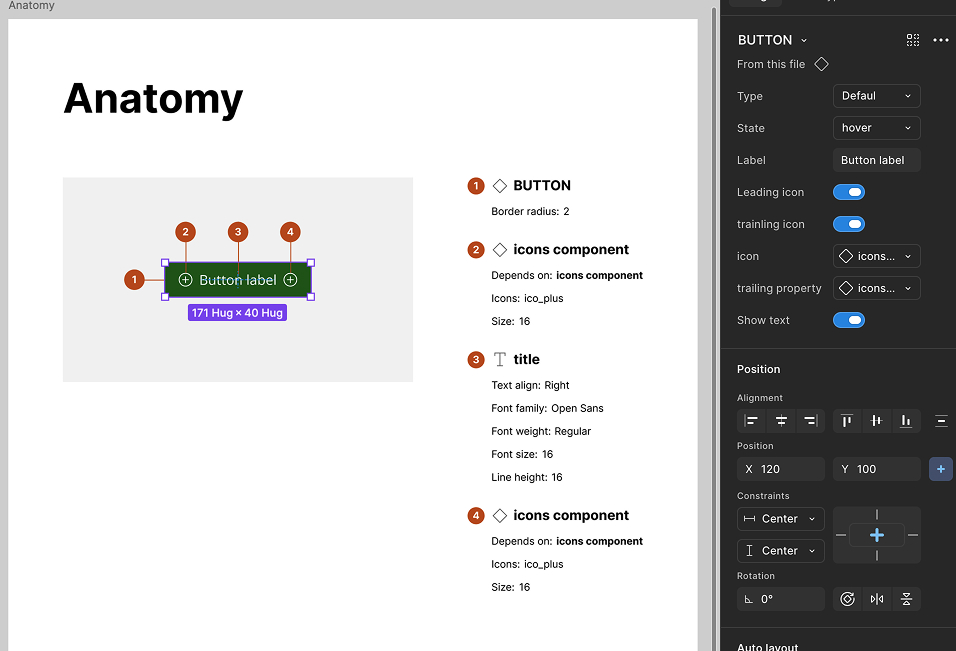
Four-layer library dependency diagram

Branching, publishing, versioning.

  • Every change goes through a branch. Direct edits to main are blocked by convention and called out in review.
  • Publishing follows semver: patch for token tweaks, minor for new components or non-breaking variants, major for renamed props or removed components.
  • Release notes are written alongside the merge, not after. Notes name the components changed, the engineer to notify, and the migration if any.
04 · Figma → code pipeline

The Figma component is the spec. Engineering shouldn't have to interpret.

This works because the structure is identical on both sides — names, props, slot names, token references all map one-to-one.

FigmaVue.js
Component nameVue SFC name. Button.figButton.vue
Component propertyVue prop with matching name and type. Variant=primaryvariant: 'primary'
Boolean propertyVue boolean prop. Disabled=truedisabled: true
Slot propertyVue named slot. Leading<slot name="leading" />
Variable (token)CSS custom property exported by Style Dictionary. color.bg.brand--color-bg-brand
Variant matrixStorybook story per variant combination, generated from the same matrix.

Handoff protocol.

  • Every component page in Figma carries a fixed annotation block: purpose · props · states · accessibility notes · motion spec · do & don't.
  • Engineering reviews the component in Figma before build, not after. Open questions are resolved at this stage.
  • After build, we run a side-by-side diff in dev mode against a fixed checklist of states.
  • Discrepancies are logged as system-level bugs, not feature bugs. They get fixed at the component, not patched per screen.
05 · Tooling

Two vibe-coded Figma plugins, both in daily use.

I vibe-coded two internal plugins using Cursor and Claude Code to automate the parts of system maintenance that were eating the team's time. Both are in active use.

Plugin 01

Similar Component Finder

Problem: As the system grew, designers in different modules quietly recreated near-duplicates. Audit was a manual, multi-day job.

What it does: Scans the file, clusters near-duplicate components using structural and semantic similarity, and surfaces consolidation candidates with side-by-side diff previews.

Days → minutesAudit time
Pre-releaseUsed before every release
Plugin 02

Design Debt Collector

Problem: Detached instances, hardcoded colors that bypassed tokens, deprecated components still in use, missing variants. Design debt was real but invisible.

What it does: Audits files for all four categories and exports a triage report with file, frame, and component references. Tracks delta week over week.

Ranked backlogNot a vague worry
Weekly deltaShared in design review

AI in the daily workflow. Beyond the plugins, AI is part of how the team works. Cursor + Claude Code for plugin development. Google Stitch + Gemini Code Assist for prototype generation. Claude for documentation drafts and decision-record summaries. The principle: automate the repetitive, free the team for the judgment calls.

06 · Governance & contribution

A contribution model that scales beyond the core team.

RoleResponsibility
System owner (me)Roadmap, architecture, breaking changes, final review.
Core contributorsTwo designers and one front-end engineer. Triage intake, build and review components, maintain documentation.
Product contributorsAny designer or engineer outside the core. Can propose and build, with required review steps.

Contribution flow.

  1. Intake — contributor opens a request with problem, proposed component, and screens where it is needed.
  2. Triage — core team decides build / defer / use existing. Decision posted in the system channel.
  3. Build — contributor builds on a Figma branch following naming, variant, and Auto Layout standards.
  4. Review — core team reviews against the quality gates. Engineering Architect signs off on the implementation plan.
  5. Merge & document — component merged, release notes published, documentation updated, engineer notified.

Quality gates. No component ships without passing all four:

  • A
    Accessibility
    WCAG 2.2 AA contrast, keyboard support, focus management, screen reader semantics documented.
  • C
    Consistency
    Uses tokens only. No hardcoded values. Follows naming and variant standards.
  • D
    Documentation
    Purpose, props, states, do & don't, motion spec, accessibility notes filled in.
  • I
    Implementation parity
    Vue component built and reviewed against the Figma component before close-out.
07 · Accessibility

Baked into tokens, components, and patterns — not a late-stage fix.

  • Token level. All color pairings used in semantic tokens are pre-checked against WCAG 2.2 AA. APCA is used for borderline calls. A failing color pair simply does not exist in the semantic set.
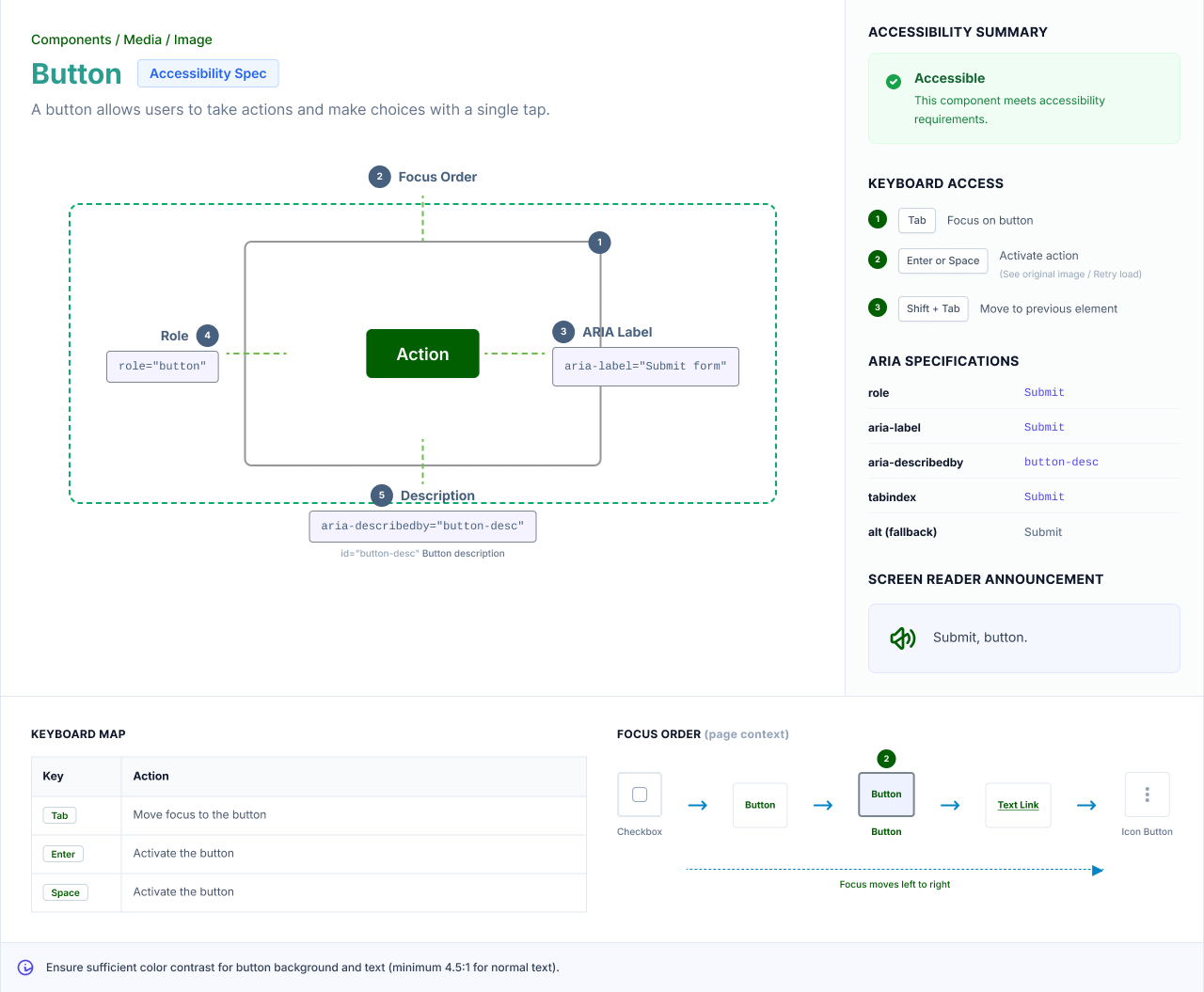
  • Component level. Each component carries an accessibility spec: keyboard interactions, focus order, ARIA semantics, screen reader announcements, error association. Engineering uses this directly in build.
  • Pattern level. Flow-level patterns (forms, modals, AI confirmations, multi-step wizards) carry their own accessibility notes covering focus traps, live regions, and error recovery.
Four-layer library dependency diagram
11 · What I'd do differently

Three things I'd do earlier next time.

EARLIER

Lock the token JSON export contract with engineering on day one. We retrofitted it later and paid a small migration cost.

EARLIER

Start the Design Debt Collector plugin earlier. By the time it shipped, we already had a backlog of debt to triage.

EARLIER

Invest in dev-mode-ready annotations from the first component, not from the tenth. Going back to annotate is slower than annotating as you build.

12 · Outcomes

A living product, not a deliverable.

250+
COMPONENTS · WEB +
MOBILE · MAPPED TO VUE.JS
Multi-mode
THEME · DARK · DENSITY ·
WHITE-LABEL · NO FORKS
2
INTERNAL PLUGINS
IN DAILY USE
Weekly
ADOPTION + DEBT
METRICS WITH DELTA
8+
AI USE CASES SHIPPED
ON SYSTEM PRIMITIVES
WCAG 2.2 AA
BAKED INTO TOKENS,
COMPONENTS, PATTERNS
6-member
DESIGN TEAM
+ EXTERNAL CONTRIBUTORS
From zero
OCT 2024 →
NOW & ONGOING

The system is a living product, not a deliverable. Treating it that way — with a roadmap, contributors, release notes, quality gates, and metrics — is what keeps it healthy as the surface area grows. The work continues. — Closing principle

© 2026 Bobin Thomas · Bengaluru bobinthomas@gmail.com · /in/bobint · techyminds.in/bt