AI use case HikeOn ERP Compliance Extract · validate · flag

Vendor certificate management. The AI that reads, checks, and flags every supplier document.

One of eight AI use cases in the HikeOn ERP, built on the shared "AI cell" pattern. When a vendor uploads a certificate, the system extracts what matters, validates it against what the product category requires, and flags anything missing or expiring, so compliance stops living in spreadsheets.

Trigger
On upload
PDF or image
Headline metric
94% auto-validated
No manual re-key
Surfaces in
Vendor profile
PO vendor picker · compliance view
Pattern
Shared AI cell
Suggest · confidence · why · override
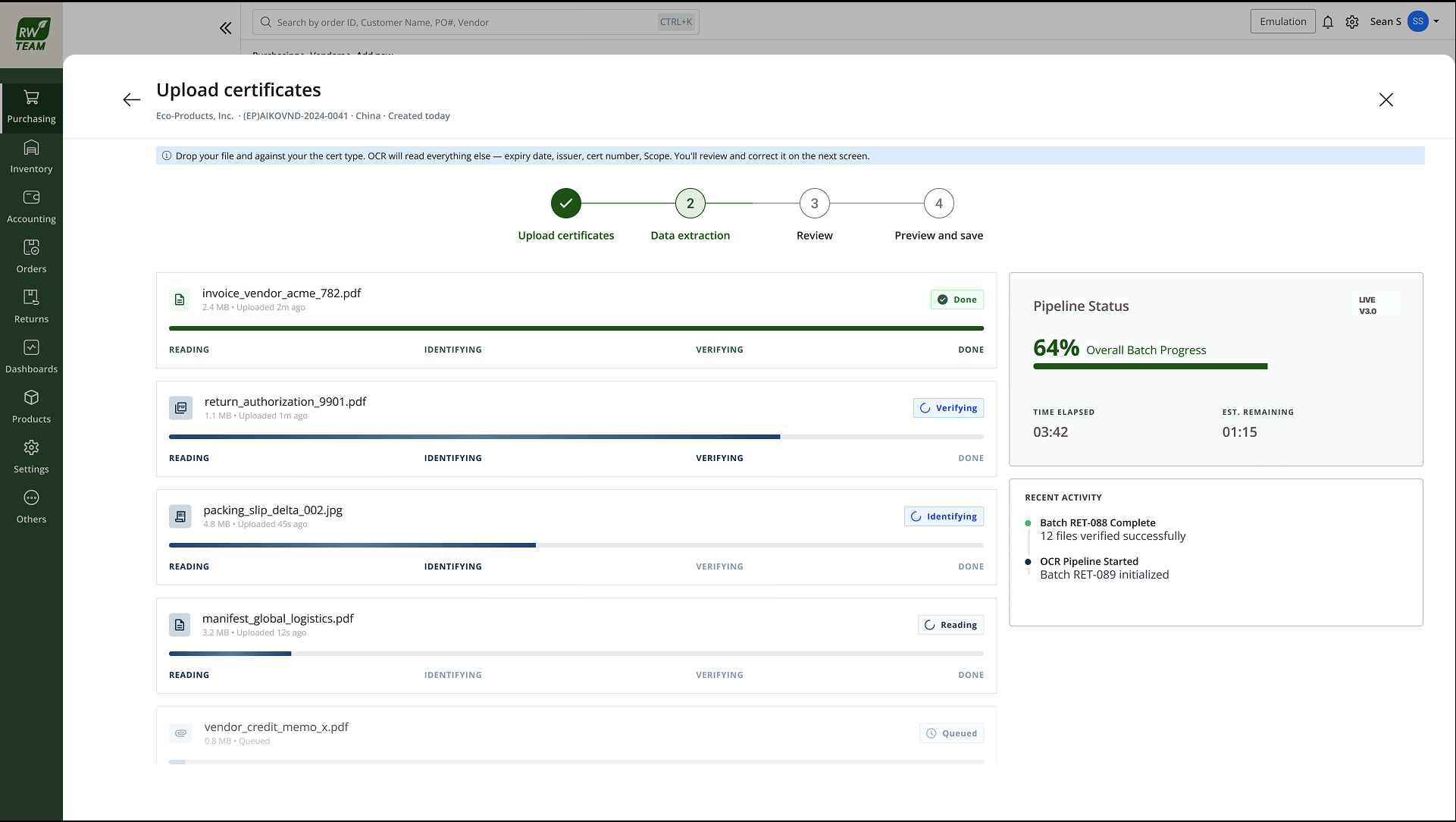
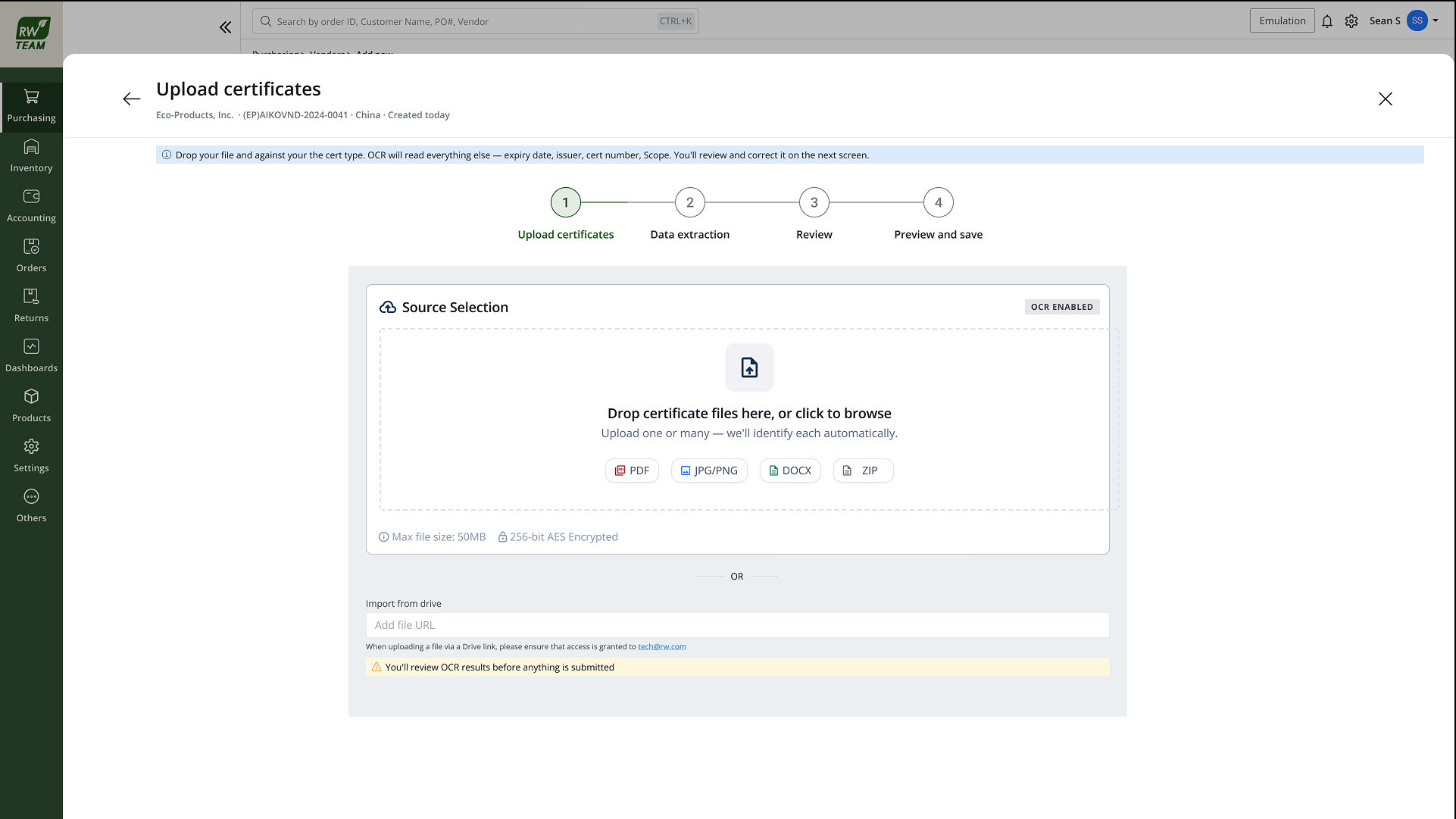
Upload certificates, drag-and-drop source selection with OCR enabled
Step 1 Upload certificates · drag-and-drop, OCR enabled
01 · The problem

Certificates arrived by email. Expiry lived in a spreadsheet. POs didn't know either.

Restaurantware sources food-contact and packaging products from dozens of suppliers, each required to hold category-specific compliance documents. SQF, FDA registration, material safety sheets, and others depending on what they supply. Before this feature, the workflow was entirely manual:

  • Certs collected out of band. Vendors emailed PDFs; purchasing saved them to shared drives with no structured record in the ERP.
  • Expiry tracked in spreadsheets. A compliance coordinator maintained a separate tracker. It drifted from reality within weeks.
  • No link to purchasing. A buyer could raise a PO to a vendor whose SQF cert had lapsed. The system had no way to know.
  • Review was slow. Every upload meant someone opening the PDF, reading dates by hand, and typing fields into a form.

The compliance risk wasn't theoretical. A lapsed cert on a food-contact supplier is an audit finding waiting to happen. The design job was to make cert validity a first-class record in the ERP: read automatically, checked against category rules, and visible at the moment someone decides to buy.

02 · How it works

Three steps: extract, validate, flag.

  • Extract. On upload, the model reads the document. PDF or scanned image, and pulls certificate type, issuing body, issue date, expiry date, and scope (which product categories or materials the cert covers). Low-quality scans still extract; confidence drops rather than failing silently.
  • Validate. Extracted fields are checked against the category's required-cert matrix: does this vendor supply a category that needs SQF? Is the cert type one of the accepted ones? Is the expiry date in the future? Does the scope cover the categories this vendor is approved for?
  • Flag. Anything that fails validation surfaces immediately: missing required cert for a category, cert expiring within 60 days, expired cert, or scope mismatch. Flags appear on the vendor profile, in the compliance dashboard, and inline when a buyer selects that vendor on a PO, before the order is submitted.
03 · How it uses the "AI cell" pattern

Same four parts as every other AI surface, so reviewers know what to trust.

Suggestion

"SQF Food Safety cert · expires 12 Mar 2026 · covers food-contact packaging." The AI cell opens with a plain-language summary of what it read, type, expiry, and scope, so the reviewer knows what they're confirming before they look at the fields.

Confidence

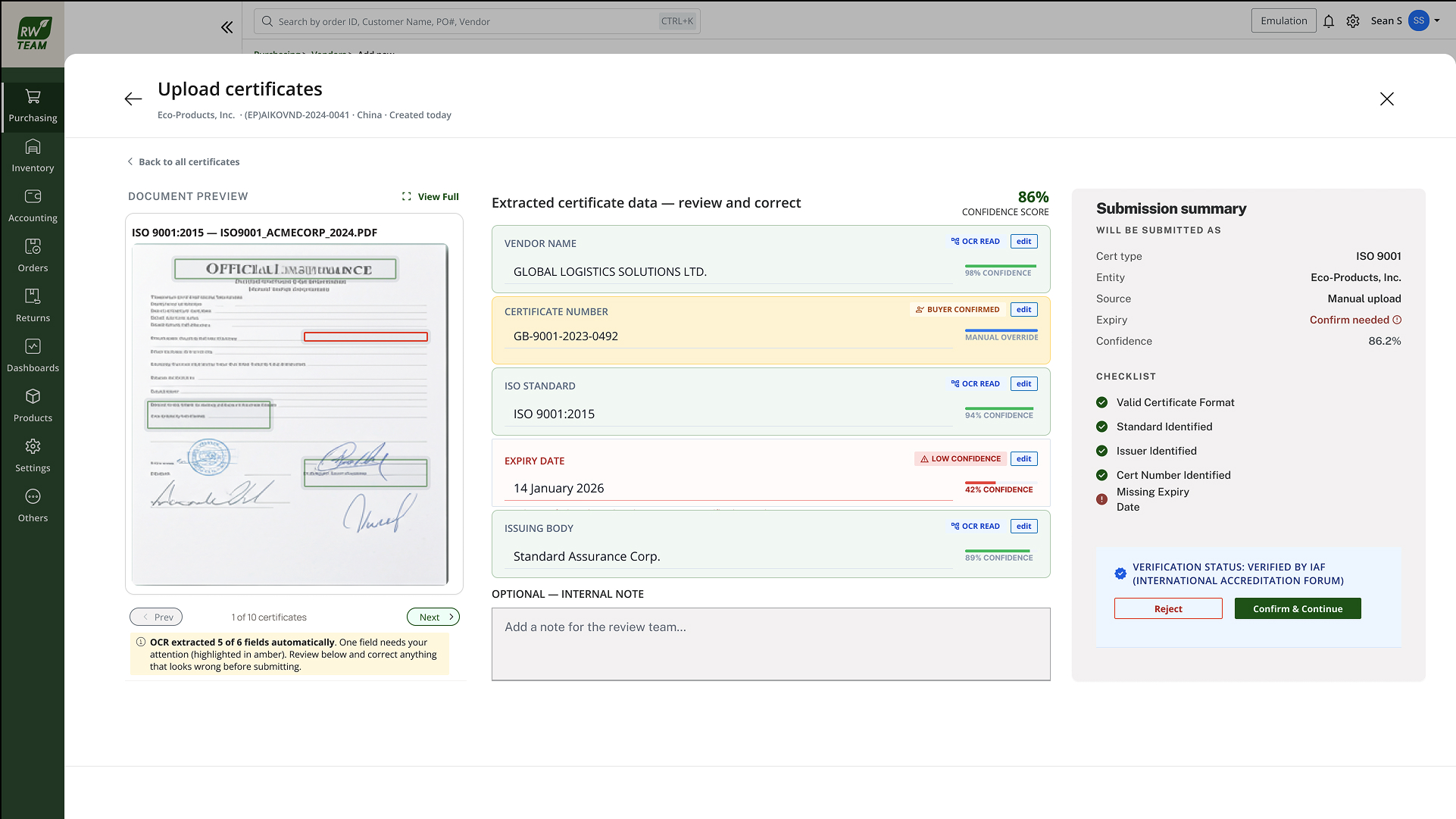
A percentage score on the overall read and per-field confidence on ambiguous extractions. Below threshold, common on phone photos or skewed scans. The cell switches to a "needs review" state: fields are pre-filled but not trusted until a human confirms.

"Why this?"

The explainer shows which text regions in the document drove each extracted field, and which category rules matched or failed. A reviewer can see why the system flagged "expiring soon" without opening the raw PDF in another tab.

Accept · edit · dismiss

Accept writes the extracted fields to the vendor record. Edit lets the reviewer correct a misread type or date before accepting. The correction is logged. Dismiss handles wrong-document uploads (someone attached an invoice instead of a cert) without polluting the compliance record.

04 · The design

Upload on the left. Extracted fields on the right. Confidence on every line.

The review screen is a split layout: original document on the left, extracted fields and the AI cell on the right. Each field shows its confidence inline, high-confidence fields are visually quiet; low-confidence ones get an amber indicator and open for edit by default.

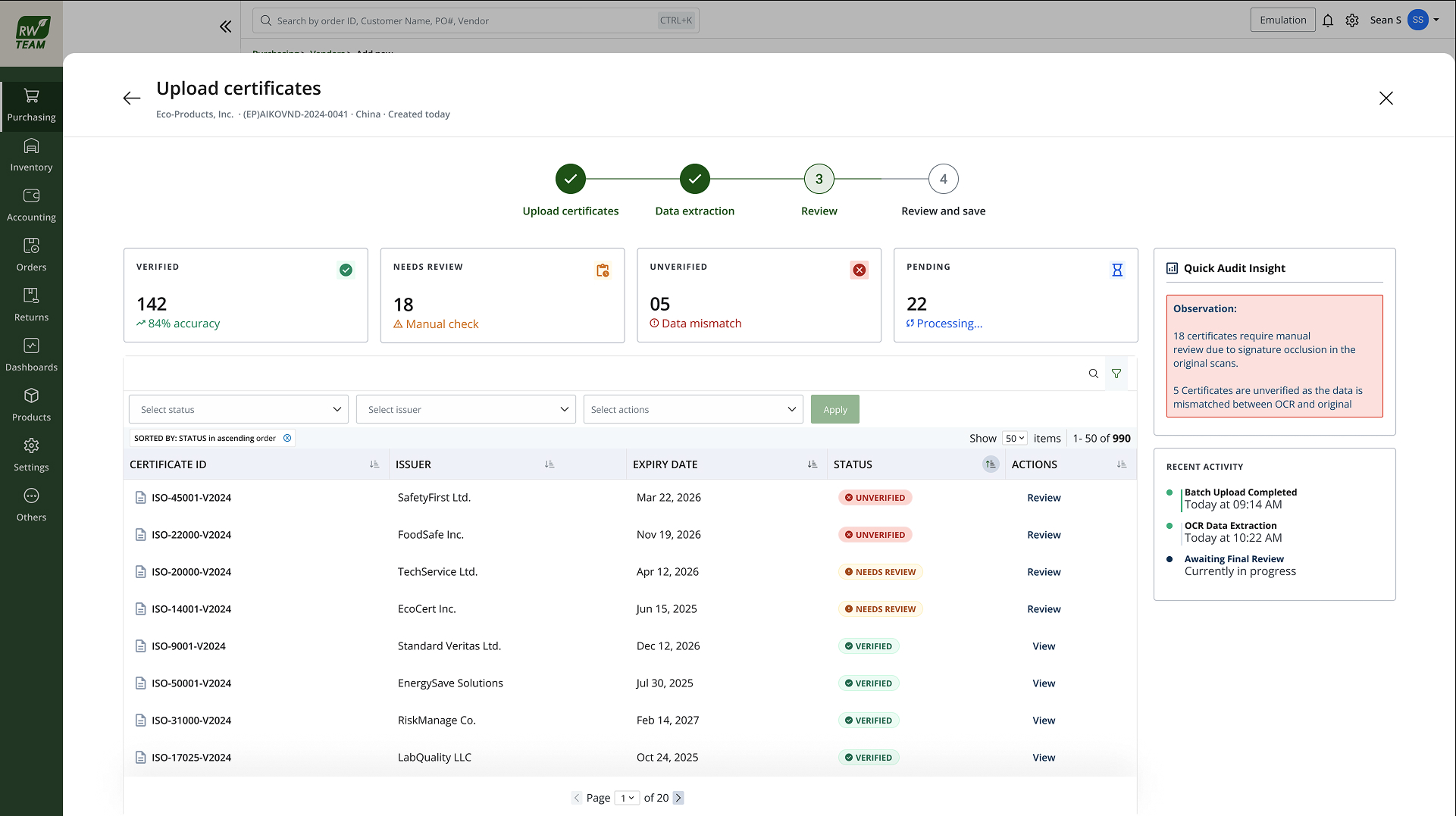
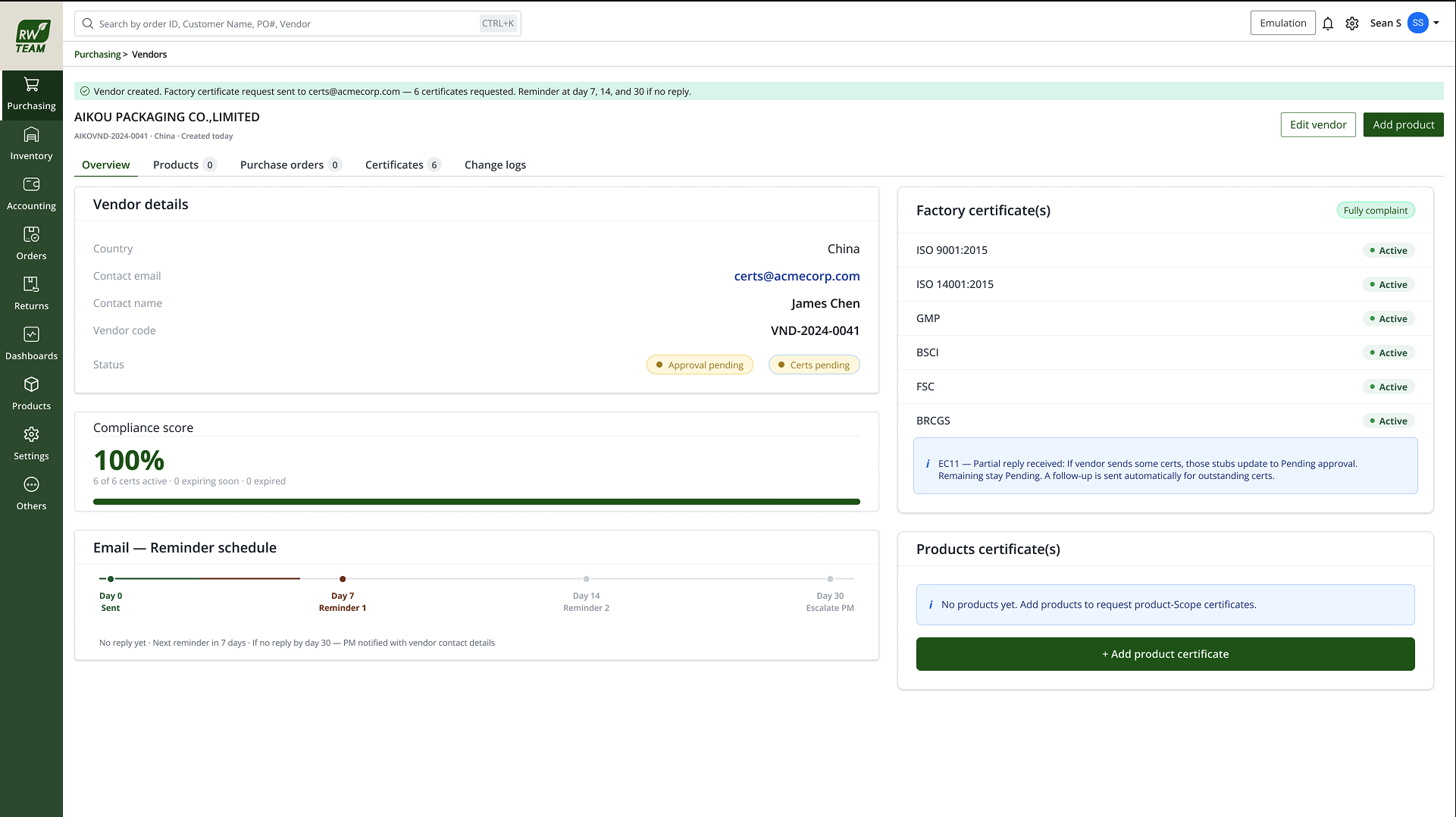
  • Vendor profile. Upload dropzone on the vendor's Documents tab. Once accepted, certs appear in a list with type, expiry, and status chip (valid · expiring · expired · missing).
  • PO vendor picker. When a buyer selects a vendor, a compliance strip shows cert status for the categories on that PO. A hard block on expired required certs; a soft warning on expiring-soon with an override path for urgent orders.
  • Compliance dashboard. Purchasing leads see all vendors sorted by risk, expired first, then expiring within 60 days, then missing required docs, with bulk export for audit prep.
05 · Edge cases & trust

When the AI isn't sure, the human decides, and the system remembers.

  • Low-confidence extraction. Fields pre-fill but stay in "pending review" until accepted. PO soft-warning only, no hard block on unconfirmed reads.
  • Unknown cert type. The model suggests the closest match; the reviewer picks the correct type from a dropdown. The mapping is stored so the next upload from that issuer is faster.
  • Expired cert. Hard flag on the vendor profile and a block on new POs for affected categories until a valid replacement is uploaded and accepted.
  • Missing required cert. Vendor can be active for categories they already hold docs for; the gap shows as a persistent flag on categories they're approved for but haven't uploaded.
  • Conflicting documents. Two uploads of the same cert type. The newer accepted upload wins. The older doc moves to history with timestamp and reviewer name for audit trail.

The design principle: AI does the reading; humans do the trusting. Nothing extracted goes into the compliance record without an explicit accept, and every override is logged.

06 · Outcome

94% of uploads validated without manual re-key.

Of certificates uploaded in the first three months live, 94% were auto-validated, extracted, matched against category rules, and accepted by reviewers without correcting a single field. The remaining 6% were low-confidence scans or unknown cert types that needed a human pick before the record was trusted.

Purchasing leads report the compliance dashboard replaced the spreadsheet tracker within the first month. Buyers see cert status at PO creation for the first time, previously a separate email check.

94%
CERTS AUTO-VALIDATED
NO MANUAL RE-KEY
On upload
TRIGGER
PDF · IMAGE
3 surfaces
VENDOR PROFILE
PO PICKER · DASHBOARD
AI cell
SHARED PATTERN
WITH 7 OTHER USE CASES